
This isn’t particularly new information, but the implementation details were new and surprising. In iOS apps, location permission defaults to precise location unless the developer takes pains to change the default location precision to kCLLocationAccuracyReduced and we all know the innate inertia around default values. As a result, the prompt users see more often looks like Figure 1 below. Observe the “Precise: On” in the upper left corner of the map thumbnail (outlined in yellow).
There are actually two UI dark patterns in play here: (1) bad defaults, and (2) false hierarchy. False hierarchy relates to the fact that the words “Precise: On” is actually a toggle button for the location precision, but it doesn’t register as a button and the only way to figure it out really is to accidentally tap on it. Tapping on “Precise: On”—only on the words and not on the map—changes the location resolution to “Precise: Off” (see Figure 2).
Apple seems to be refining an “obstacles for thee but not for me” habit in user interface design (see also recent EU finding on the dark patterns in how Apple’s UI implementation of App Tracking Transparency https://www.fairpatterns.ai/post/eu-targets-addictive-design-apple-faces-antitrust-action-india-penalizes-dark-patterns).
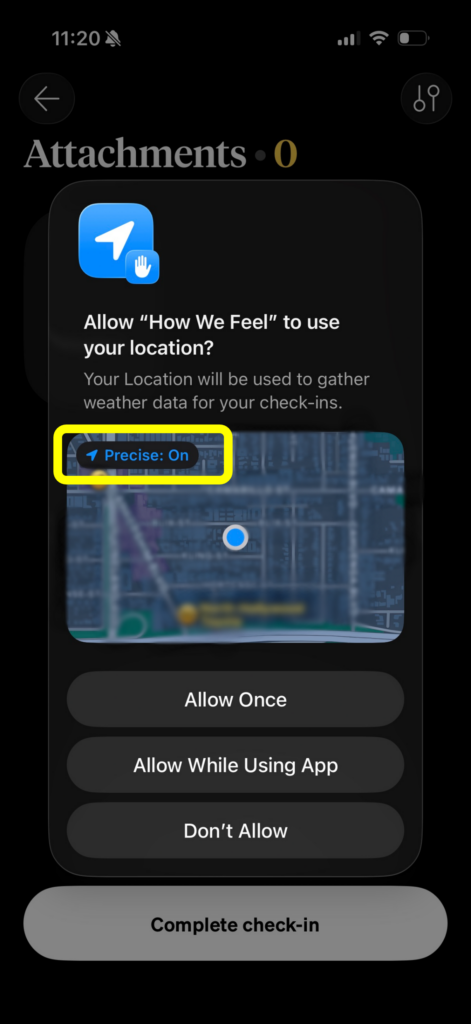 Figure 1: Default to Precise Location
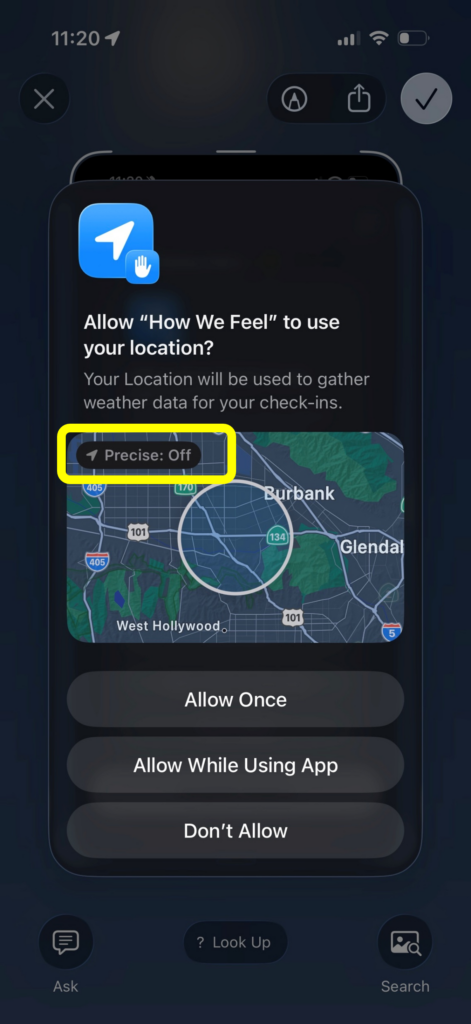 Figure 2: After Tapping on “Precise: On”